
What is a VPS? Definition, how it works, differences with shared and dedicated hosting, pricing and 6 criteria to choose the right virtual private server.
By Tarzs GNIMAGNON, ITNET Technologies · Updated 13 October 2026 · Reading time: 9 min

Your site slows down at peak times, your shared hosting blocks the software you need, and everyone keeps telling you "you need a VPS". The question is what a VPS really is, whether it suits your project, and how much it costs. This guide answers all three: what a VPS is and how it works, how it differs from shared, dedicated and cloud hosting, and the six criteria that matter when you choose one.
In short
- A VPS (Virtual Private Server) is an isolated slice of a physical server, with its own guaranteed resources (CPU, memory, disk) and its own operating system.
- It sits between shared hosting (cheap, little control) and a dedicated server (full control, more expensive).
- It suits sites that have outgrown shared hosting, business applications, development environments and self-hosted tools.
- At Wayhost, VPS plans start at €6.23 excl. VAT per month, and every VPS is immersion-cooled.
Contents
- What exactly is a VPS?
- How does a VPS work?
- VPS, shared, dedicated, cloud: what are the differences?
- What is a VPS used for? 6 use cases
- Pros and cons
- How much does a VPS cost?
- How to choose a VPS: 6 criteria
- Getting started: the first 5 steps
- FAQ
What exactly is a VPS?
A VPS is a virtual private server: an isolated virtual machine, hosted on a physical server shared with other customers, but with its own dedicated resources and its own operating system. You get full administrator control, just as if it were your own machine.
The clearest analogy comes from housing:
- Shared hosting = a room in a shared flat: everything is shared, and if one flatmate hogs the resources, you feel it.
- VPS = a flat in a building: the building is shared, but your home is walled off and its floor space is yours.
- Dedicated server = a detached house: the whole building is yours.
The key difference is one word: isolation. On a VPS, a neighbour's traffic spike does not slow your site down, because their resources and yours are separated at the hypervisor level.
💡 Pro tip "VPS", "virtual private server", "virtual dedicated server" and "VDS" usually describe the same product commercially. Do not stop at the name: compare the resources actually guaranteed (vCPU, RAM, disk) and the type of virtualisation.
How does a VPS work?
A VPS relies on virtualisation: software called a hypervisor splits a physical server into several sealed virtual machines, each with its share of CPU, memory and storage.
In practice:
- A powerful physical server is installed in a data centre.
- A hypervisor (KVM, Xen or VMware depending on the host) allocates and partitions its resources.
- Several VPS instances are created on that machine, each with its quota of vCPU, RAM and disk space.
- Each VPS boots its own operating system (Debian, Ubuntu, AlmaLinux, Windows Server…) and its own software stack.
- You connect to it over SSH (Linux) or Remote Desktop (Windows), with full administrator rights.
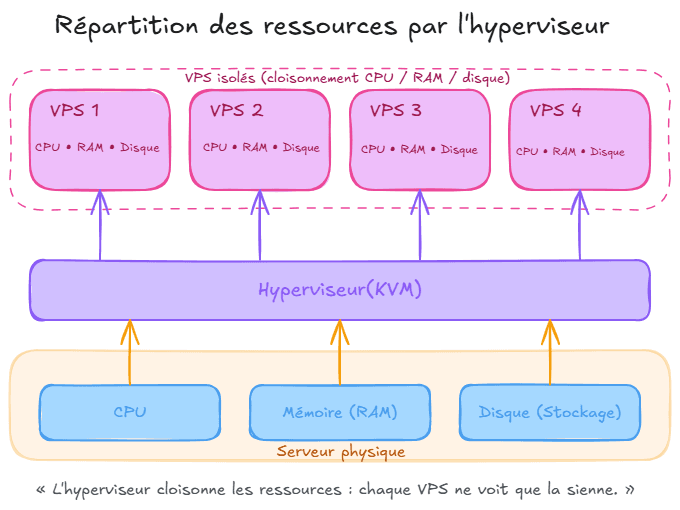
Two practical consequences:
- You can install anything: a specific PHP or Node.js version, a particular database server, a tool shared hosting does not offer.
- You are responsible for maintenance: security updates, firewall, application backups. On an unmanaged VPS, that is your job, not the host's.
VPS, shared, dedicated, cloud: what are the differences?
The difference comes down to three variables: how isolated the resources are, how much technical control you have, and price. The table below compares them.
| Criterion | Shared hosting | VPS | Dedicated server | Cloud / IaaS |
|---|---|---|---|---|
| Resources | Shared, not guaranteed | Guaranteed and isolated | Fully dedicated | Elastic, on demand |
| Root / admin access | No | Yes | Yes | Yes |
| Choice of OS | No | Yes | Yes | Yes |
| Skills required | Low | Medium | High | Medium to high |
| Scaling | Very limited | Change of tier | Hardware replacement | Immediate, automatable |
| Price level | Lowest | Mid-range | High | Variable (pay as you go) |
| Best for | Brochure site, starter blog | Busy site, business app, e-commerce | Heavy workloads, specific hardware | Highly variable load, distributed architecture |
A common misunderstanding: a VPS is not "a small dedicated server", it is a virtual dedicated server. You do not get the physical machine, but you get its software privileges. If your need concerns the hardware itself (compliance, constant raw performance, GPU), look at a dedicated physical server.
What is a VPS used for? 6 real use cases
A VPS is the right choice as soon as a project needs stable resources and freedom to install software, without justifying the cost of a whole server. The most common situations:
- A site that has outgrown shared hosting: rising traffic, slower response times, quotas reached. Our guide on moving from shared hosting to a VPS explains the method.
- An online store: cart, checkout and catalogue need steady performance, including during sales peaks. See how to choose a VPS for an online store.
- A business application or SaaS: APIs, back office, scheduled jobs, queues; everything shared hosting does not allow.
- Test and staging environments: reproduce production on a separate machine for a few euros a month.
- Self-hosted tools: Gitea, n8n, Nextcloud, Matomo, a Discord bot; the fastest-growing use case.
- A game server or real-time service: guaranteed resources and controlled latency.
💡 Pro tip If your site is a blog or a brochure site with fewer than 1,000 visitors a month, a VPS is probably oversized. The real trigger is not visitor numbers, but the need to install or configure something your current hosting refuses.
Pros and cons of a VPS
A VPS offers the best control-to-price ratio in hosting, in exchange for technical responsibility that shared hosting used to carry for you.
What you gain
- Guaranteed resources, hence predictable performance.
- Full root access and complete choice of software stack.
- Real isolation from the server's other customers.
- Step-by-step scaling without a painful migration.
- A dedicated IP address, useful for email deliverability.
What it costs you
- System administration: updates, firewall, monitoring, application backups.
- A learning curve: command line, SSH, web server configuration.
- Finite resources: beyond a certain point, you move up a tier or switch to dedicated.
- Security: a badly configured VPS is exposed from its first hour online.
How much does a VPS cost?
The price of a VPS depends on four variables: the number of vCPUs, the amount of RAM, the type and size of storage, and the commitment period. NVMe storage costs more than SATA SSD, but it radically improves database response times.
How to read a price list without being misled
Three benchmarks:
- Compare like for like. A €4 VPS with 1 vCPU and 2 GB of RAM is not "cheaper" than an €8 VPS with 4 vCPUs and 8 GB.
- Check what is included. Backups, DDoS protection, traffic, support: optional with some hosts, included with others.
- Look at the renewal price. Very low introductory prices sometimes apply only to the first period.
VPS pricing at Wayhost
At Wayhost, VPS plans start at €6.23 excl. VAT per month, with unlimited traffic, full root access, DDoS protection, daily automatic backups kept for 30 days and a 30-day money-back guarantee (price observed on 17 September 2026).
How to choose a VPS: 6 criteria that really matter
Beyond the spec sheet, six criteria determine whether a VPS will deliver over time.
- Resources sized on real usage. A moderately busy WordPress site runs well on 2 vCPUs and 4 GB of RAM; an application with a database will need more memory. Start small: moving up a tier is easier than paying for six months of unused resources.
- Storage type. NVMe is the expected standard on a VPS. On a database, the gap with a SATA disk is obvious.
- Data centre location. It affects latency for your visitors and GDPR compliance. For a European audience, hosting in France or the EU is the default choice.
- Guarantees and inclusions. Announced availability, backups, DDoS protection, support: check them before comparing prices.
- Reversibility. Can you change tier without reinstalling? Get your data back easily? A host you cannot leave is a risk, not a saving.
- The infrastructure's energy footprint. Long secondary, this criterion is becoming a governance issue: the International Energy Agency projects global data centre electricity consumption of around 945 TWh in 2030, more than double today's level (IEA, Energy and AI, April 2025).
💡 Pro tip Cooling is one of a data centre's heaviest energy loads. That is why Wayhost cools all of its VPS servers by immersion: servers sit in a dielectric liquid that removes heat far more efficiently than air, without massive ventilation. A criterion worth weighing when two offers cost the same.
Getting started with a VPS: the first 5 steps
Setting up a VPS takes about an hour if you follow the logical order.
- Choose your configuration and OS. Debian or Ubuntu if you are new to Linux; Windows Server if your application requires it.
- Secure the machine before anything else. SSH key login instead of passwords, direct root login disabled, system updated, firewall on.
- Install your application stack. Web server, PHP/Node/Python, database, TLS certificate.
- Point your domain. An A record to the VPS IP is enough; it takes minutes if you manage your domain names with the same provider.
- Set up backups and monitoring. The host's backups protect the machine, yours protect your application data: you need both.
Frequently asked questions about VPS
What is a VPS in one sentence?
A VPS is a virtual private server: an isolated slice of a physical server, with guaranteed resources (CPU, memory, storage), its own operating system and full administrator access.
What is the difference between a VPS and shared hosting?
On shared hosting, the server's resources are shared between all hosted sites and are not guaranteed: another site's activity can slow yours down. On a VPS, a share of CPU, memory and disk is reserved for you, and you freely choose the operating system and software.
What is the difference between a VPS and a dedicated server?
A dedicated server is a whole physical machine assigned to you. A VPS is a virtual machine hosted on a physical server shared with other customers, but walled off. Dedicated offers more raw power and hardware control; a VPS offers equivalent software control for a much lower budget.
Do you need to be a developer to use a VPS?
No, but basic Linux administration is needed: connecting over SSH, installing packages, configuring a firewall, reading logs. If you do not want to handle this, choose shared hosting or a managed offer.
How much does a VPS cost?
Price depends on vCPUs, RAM, storage type and commitment period. At Wayhost, VPS plans start at €6.23 excl. VAT per month, with unlimited traffic, root access, DDoS protection and daily backups included.
Can you host several websites on one VPS?
Yes. A VPS can host as many sites as its resources allow, using virtual hosts on the web server. It is one of the most common uses among agencies and freelancers.
Is a VPS more secure than shared hosting?
It is better isolated: a vulnerability on another customer's site cannot spread to yours as it can on shared hosting. However, securing the system is your job; an unmaintained VPS is more vulnerable than well-run shared hosting.
Can you change configuration after ordering?
Yes, most hosts let you move to a higher tier without reinstalling the system. Check before ordering whether it requires a reboot and whether you can scale back down.
Key takeaways
- A VPS is a virtual private server: an isolated slice of a physical server, with guaranteed resources, its own OS and full admin access.
- It sits between shared and dedicated hosting: more control and performance than the first, much cheaper than the second.
- The real trigger for switching is not visitor numbers but the need to install or configure what your current hosting refuses.
- Six selection criteria: resources, NVMe storage, data centre location, included guarantees, reversibility, energy footprint.
- System administration is yours: plan time to secure and maintain the machine, or choose a managed offer.
Want to compare in practice? Wayhost VPS plans are immersion-cooled, hosted in Europe and come with a 30-day money-back guarantee.
Article written by Tarzs GNIMAGNON, ITNET Technologies, publisher of Wayhost.cloud.