How web hosting works, shared vs VPS vs dedicated, the criteria to compare hosts and the real price to expect. The guide to choosing well.
By Mouhamed BANKOLE, CEO at ITNET Technologies · Updated 13 October 2026 · Reading time: 11 min
You have a site to put online, a store to launch or an old plan to replace, and every host's catalogue looks the same. Shared, VPS, dedicated, "unlimited", slashed prices: it is hard to know what you are actually buying. This guide explains how web hosting works, what separates the main families of offers and which criteria decide between two hosts. You will then know which plan fits your project, and at what real price.
In short
- Web hosting means renting space on a server permanently connected to the Internet, which stores your site's files and sends them to visitors.
- There are three main families: shared hosting (shared server, cheapest), VPS (reserved resources on a virtualised server) and dedicated servers (a whole machine for you).
- The right choice depends on traffic, available technical skills and the need for control, not on the teaser price.
- The criteria that matter: NVMe storage, restorable backups, SSL certificate included, data location, reachable support and renewal price.
- Domain names and hosting are two separate services, which you can buy from the same provider or separately.
Contents
- What is web hosting?
- How does web hosting work in practice?
- What are the different types of web hosting?
- Shared, VPS or dedicated: which suits your project?
- Which criteria should you compare between two hosts?
- How does a host protect your site?
- Why does data location matter?
- Should you get your domain and email from your host?
- How much does web hosting cost?
- How do you change host without breaking your site?
What is web hosting?
Web hosting is a service that rents space and computing power on a server connected to the Internet 24/7, so your site is reachable at all times. The server stores the site's files (pages, images, scripts), its database and often your mailboxes.
Without a host, a site only exists on its creator's computer. A host provides three things that are hard to manage at home:
- a machine that is always on, powered and cooled in a data centre;
- a high-capacity network connection, able to serve many visitors at once;
- technical operations: system updates, monitoring, backups and support.
Web host, website host, hosting provider: the service is the same. What varies is how much of the server is reserved for you and how much management is included.
How does web hosting work in practice?
When a visitor types your address, their browser queries DNS to find your server's IP address, then requests the pages from that server, which sends them back. It all happens in fractions of a second.
A page's journey breaks down as follows:
- the visitor types your-site.com or clicks a link;
- DNS translates that name into an IP address, your host's server;
- the browser opens an encrypted (HTTPS) connection with that server;
- the web server (Apache, Nginx or LiteSpeed) runs the site's code, PHP for example, and queries the database;
- the generated page is sent to the browser, which displays it.
Each step consumes resources: CPU, memory, disk reads. That is why a site's speed depends as much on hosting as on the site itself. Google measures this experience with Core Web Vitals and considers that the main content should display in under 2.5 seconds (web.dev).
The most common case is a CMS-based site: WordPress powers about 40.1% of all websites according to W3Techs (measured on 12 October 2026). Suitable hosting must therefore run PHP and MySQL well.
What are the different types of web hosting?
There are three main families of web hosting: shared, VPS and dedicated servers, plus on-demand cloud. They differ in how resources are shared and how much control the customer gets.
| Type | Resources | Technical control | Best for |
|---|---|---|---|
| Shared | Shared between several customers | Control panel, no admin access | Brochure site, blog, small store |
| VPS | Reserved on a virtualised server | Full admin access | Busy site, store, several sites, applications |
| Dedicated server | A whole physical machine | Total, down to the hardware | Heavy, constant load, compliance constraints |
| On-demand cloud | Allocated and billed by usage | Varies by service | Very irregular traffic, technical teams |
A few useful details:
- Shared hosting is managed by the host: you install nothing at system level, but you share the machine with other sites.
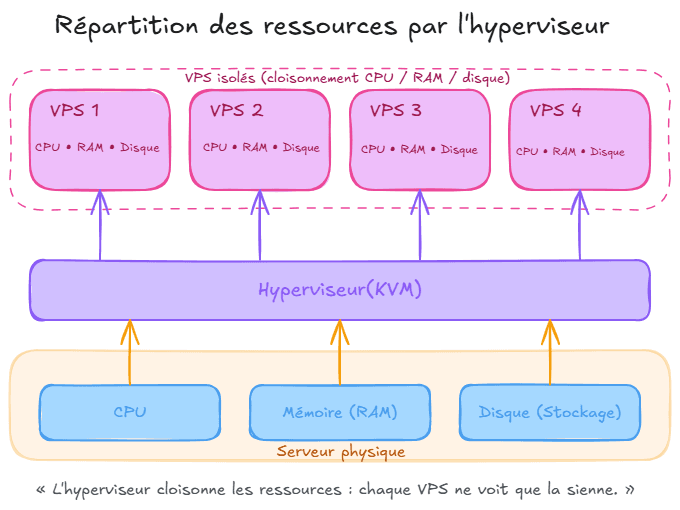
- A VPS isolates your resources through virtualisation. To go further, our guide What is a VPS? details how it works and what it is used for.
- A dedicated server removes all neighbours: the whole machine is yours.
Shared, VPS or dedicated: which should you choose for your project?
Choose shared hosting for a simple site with moderate traffic, a VPS as soon as you need guaranteed performance or technical freedom, and dedicated for heavy, constant loads. The right level covers your current need with headroom, not the most powerful one.
Shared hosting suits you if:
- you publish a brochure site, blog or portfolio;
- you do not want to administer a server;
- your traffic is steady, without big peaks.
Move to a VPS if:
- your online store slows down at peak times;
- you manage several sites, for clients for example;
- you need software shared hosting does not offer (Node.js, Docker, a specific database);
- you want to choose the exact version of each component.
A dedicated server makes sense if:
- the load is high all the time;
- you need specific hardware or physical isolation;
- a team knows how to administer it.
Pro tip: start at the level you actually need, but check before signing that you can move up without a manual migration. That is what saves you from starting over the day your site takes off.
Which criteria should you compare between two hosts?
Compare what can be measured first: storage type, resources actually allocated, uptime commitment, backups, support and renewal price. "Unlimited" is rarely the right criterion: it almost always hides a fair-use limit.
The checklist to apply to each offer:
- Storage: an NVMe disk responds much faster than a SATA SSD or a hard drive, which speeds up database queries.
- Resources: how much CPU and memory is guaranteed, and what happens if you exceed it?
- Availability: a written commitment (SLA) with planned compensation beats a promise on the home page.
- PHP version: you must be able to choose and update it.
- Access: SSH, WP-CLI, database management from the panel.
- Support: reachable through which channels, at what hours, by humans or by a bot?
- Terms: trial period, refunds, commitment length.
For example, the Wayhost web hosting page advertises NVMe storage, a 99.9% availability SLA with service credits, 24/7 human support and a 30-day money-back guarantee (observed on 12 October 2026).
How does a host protect your site?
A good host protects your site on three fronts: encrypted traffic, defence against network attacks and the ability to restore a clean version. Backups are the last safety net: a breach or a wrong move is unforgiving without them.
Points to check:
- A free SSL certificate renewed automatically for every site and subdomain: without it, browsers display a warning.
- DDoS protection included, not sold as an option.
- Automatic backups with point-in-time restore from the panel, without opening a ticket.
- Isolation between accounts on shared hosting, so a hacked neighbour does not contaminate your site.
- Firewall and anti-spam on email.
Test a restore at least once after going live. A backup that has never been restored remains a hypothesis.
Why does data location matter?
The data centre's location determines both how fast your site loads for visitors and which law applies to your data. A server close to your audience responds faster, and hosting in the European Union simplifies GDPR compliance.
Questions to ask the host:
- in which country and city the data centre is located;
- whether the host depends on a company subject to non-European law;
- where backups are stored, sometimes in a different country from the main server;
- whether you can choose the region when ordering.
For the most sensitive data, France's cybersecurity agency ANSSI defined the SecNumCloud qualification framework, which notably covers protection against extraterritorial laws. Most brochure sites do not need it, but European hosting remains a good reflex. Our guide on VPS in France goes into the details.
Should you get your domain name and email from your host?
It is not mandatory: domain name, hosting and email are three separate services, linked by DNS configuration. Grouping them with one provider simplifies management and billing.
What you need to know:
- The domain name is your site's address; it is rented from a registrar. Our domain name page details available extensions and DNS management.
- Hosting holds the site; you connect it to the domain by editing DNS records (A, CNAME).
- Email uses the domain's MX records; it can be included in hosting or bought separately, like a professional email plan.
Keeping the domain in your own name, with access to its management interface, is the golden rule: it is what lets you change host without losing your address.
How much does web hosting cost?
Shared hosting costs a few euros a month, while a VPS starts higher and a dedicated server higher still. The displayed price is only a starting point: check the renewal price, VAT and commitment length.
Classic traps:
- the launch price often applies only to the first period and requires annual payment;
- prices excluding VAT are highlighted on professional offers;
- paid options: backups, certificate, dedicated IP address;
- the "free" domain is usually free only for the first year.
At Wayhost, web hosting is listed from €1.99 excl. VAT per month and VPS plans from €6.23 excl. VAT per month; launch prices apply to the first period with annual billing, and the domain is free for the first year on annual plans (observed on 12 October 2026).
Pro tip: calculate the cost over three years, renewals included. It is the only honest way to compare two offers.
How do you change host without breaking your site?
To change host without downtime, copy the site to the new server, test it, then switch DNS once everything is validated. The old hosting must stay active during propagation.
The six-step method:
- lower the time to live (TTL) of DNS records a few days before;
- back up files, database and email;
- restore everything with the new host;
- test the site via a temporary address or the hosts file;
- change the DNS records to point to the new server;
- monitor errors for a few days before cancelling the old plan.
Many hosts offer to handle the migration for you. If you are moving from shared hosting to a VPS, our article on moving from shared hosting to a VPS without downtime details each step.
Frequently asked questions
What is web hosting, in one sentence?
Web hosting is renting space on a server permanently connected to the Internet, which stores your site and sends it to visitors. Without it, a site cannot be viewed online.
What is the difference between a host and a domain name?
The host provides the server that holds the site's files. The domain name is the readable address pointing to that server. Both are needed, and they are linked through DNS configuration.
Can you have your domain name and hosting with two different providers?
Yes, absolutely. You simply point the domain's DNS records to the chosen host's server. Grouping both with one provider only simplifies management and billing.
What is the difference between shared hosting and a VPS?
On shared hosting, several sites share the resources of one server managed by the host. On a VPS, part of the server is reserved for you through virtualisation and you are its administrator. A VPS therefore offers steadier performance and more freedom, in exchange for a bit more technical work.
Do you need technical skills to manage a VPS?
A VPS requires basic system administration: SSH login, updates, web server configuration. A control panel installed on the VPS makes these tasks much easier. Without any skills or provider support, shared hosting remains the better fit.
Can you move from shared hosting to a VPS without starting over?
Yes, the site is copied as is with its files, database and email, then DNS is switched to the new server. The old hosting stays active during the transition to avoid any downtime. The site's content and address do not change.
Is free web hosting a good idea?
For a test or a personal project, it can do. For a professional site, it has serious limits: imposed subdomain, ads, reduced resources and few guarantees on backups. Entry-level paid hosting offers far more security for a few euros a month.
How many sites can you put on one hosting plan?
It depends on the offer: some shared plans accept only one site, others several. On a VPS, the only limit is the server's resources. Check this in the plan details before subscribing.
Is an SSL certificate essential?
Yes, because it encrypts traffic between the visitor and the site and avoids the browser's "Not secure" warning. Most serious hosts include it free and renew it automatically. It is essential as soon as a form or payment is involved.
Key takeaways
- Web hosting rents space on an always-on server to make your site accessible.
- Shared, VPS and dedicated meet growing needs for performance and control.
- Compare storage, backups, SSL, support and renewal price, not the teaser price.
- Prefer hosting in Europe for speed and GDPR compliance.
- Keep your domain name in your own name: it is what leaves you free to change host.
For a first site, discover Wayhost web hosting; if your project needs more power, compare our VPS plans.
Article written by Mouhamed BANKOLE, CEO at ITNET Technologies.